Skim: reading one word at a time, and what it costs
Notes on an iPhone app that shows text one word at a time, what the research says that kind of reading costs, and the design choices I made to pay it back.
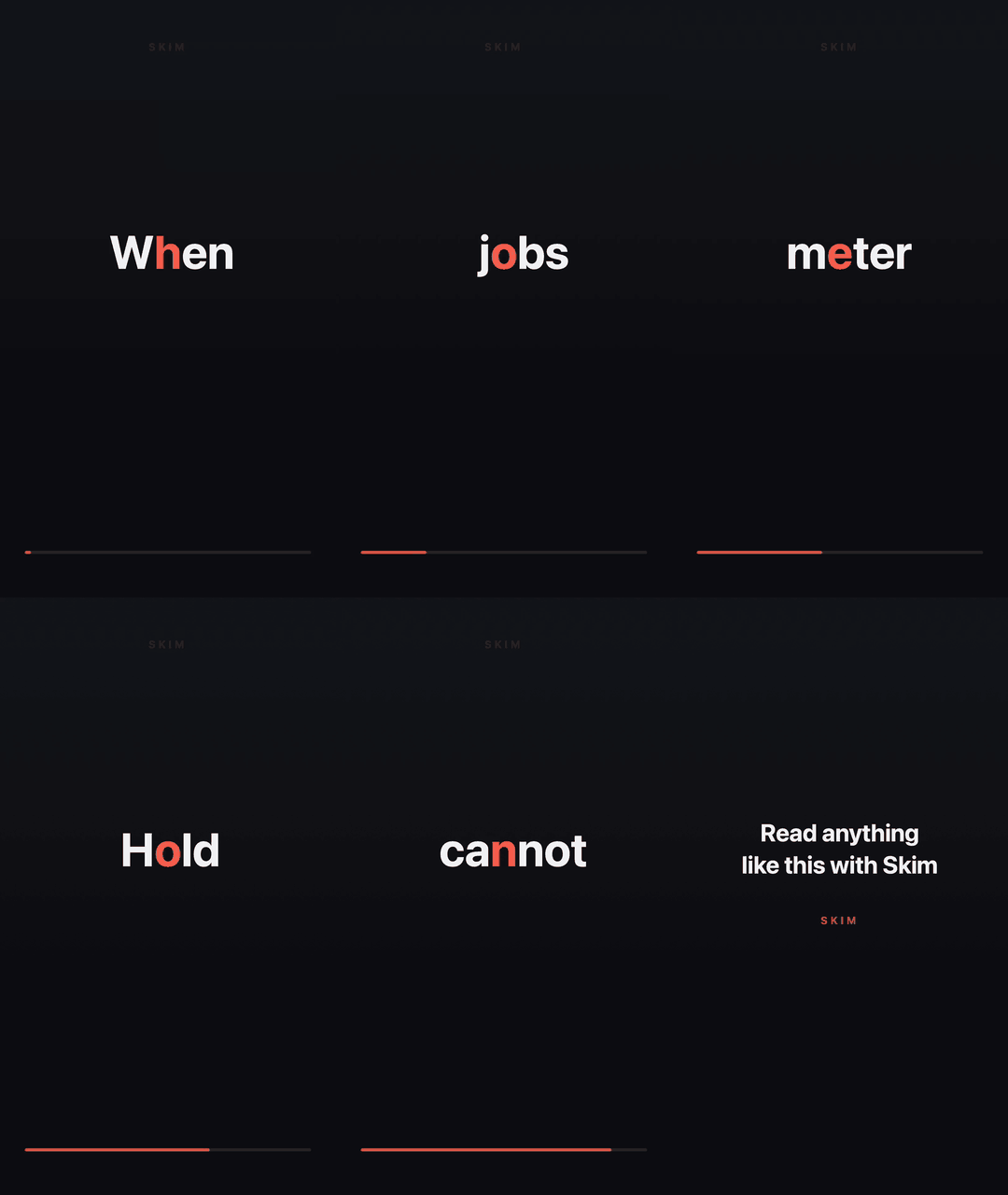
Since June I’ve been building Skim, an iPhone app (and later a small Mac companion) for reading one word at a time. You copy some text, open the app, and hold your thumb anywhere on the screen. Words appear in the same spot, one after another, at a steady pace. Let go and it stops.
The GIF above is a real export from the app’s video renderer, at the default setting of 400 words per minute.
The technique has a name, rapid serial visual presentation (RSVP), and a reputation. A decade ago a startup called Spritz promised you could read a novel in an afternoon. The pitch was speed, and the fine print was comprehension. I didn’t want to build that, and most of this post is about why, what the research says, and which design choices came out of it.
Two jobs at once
The first line of the product doc I wrote for myself says: “A machine for upgrading attention, comprehension, and extraction from text. Not a speed-reading app.”
The burden I care about is that reading on a phone makes you do two jobs at once. You move your eyes forward, and you also police your own attention: keep going, no, go back, wait, did I get that, how much is left? On a phone, every line competes with the scroll gesture, the notification, the next tab, and the urge to skim ahead. A lot of the effort that should go to understanding goes into staying on the line.
RSVP takes the second job away. The text arrives at a cadence you can’t outrun and can’t fall behind. There’s nothing to scroll and no “67% remaining.” The doctrine I kept coming back to was:
The instrument supplies the discipline so the mind can supply the attention.
That framing drives almost every decision below. It’s also why there are no streaks, no leaderboards, no words-per-minute trophies, and no accounts. Every one of those turns a calm tool into a performance test. Every feature idea gets held to one question:
Does it hand the user’s attention back to them, or quietly take it away again?
What it looks like
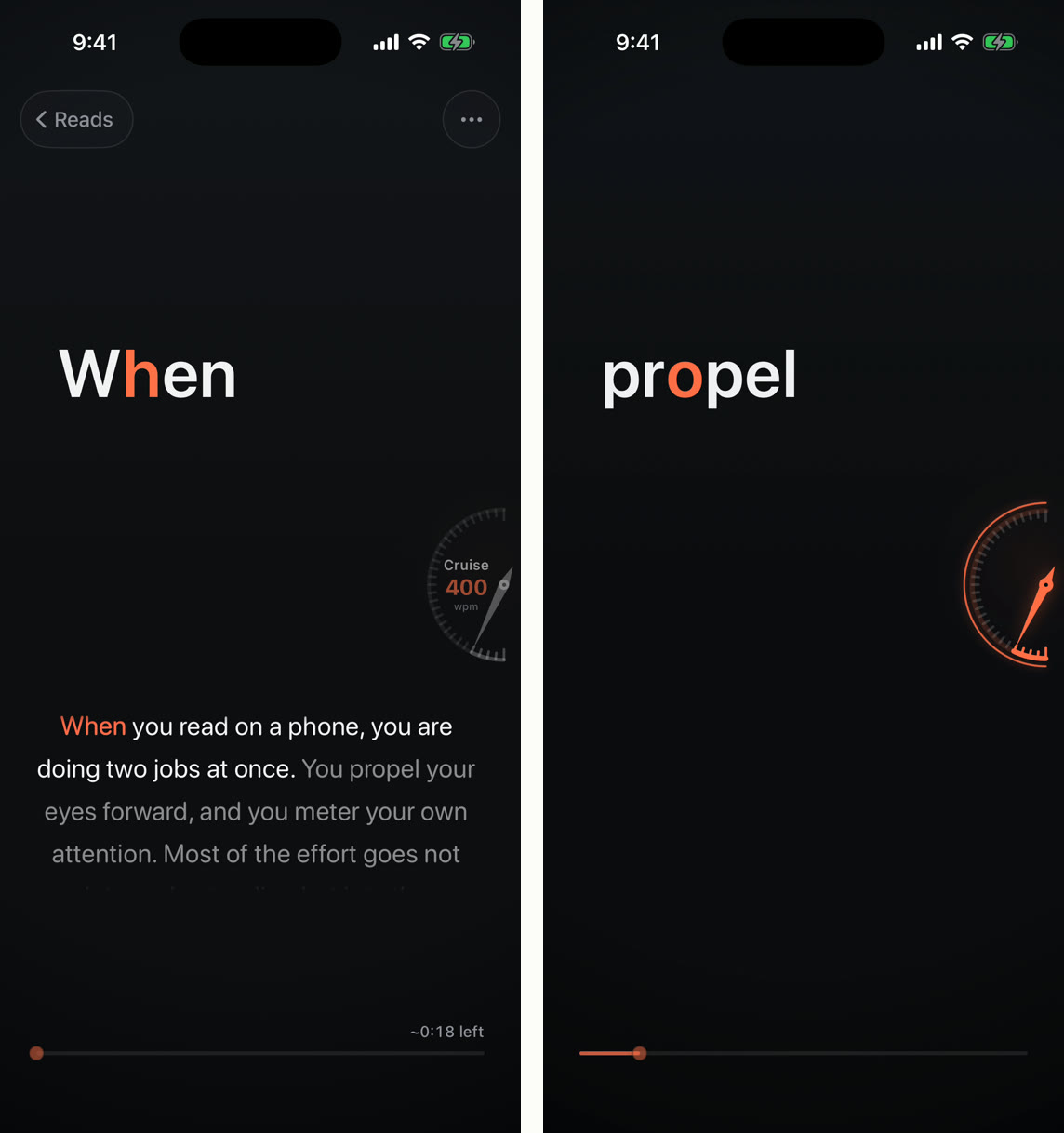
On the left is the paused screen, and on the right is what you see while reading: one word, a faint progress line, and a speed dial that only shows up while it matters. There are no buttons on the reading surface. Everything is a gesture.
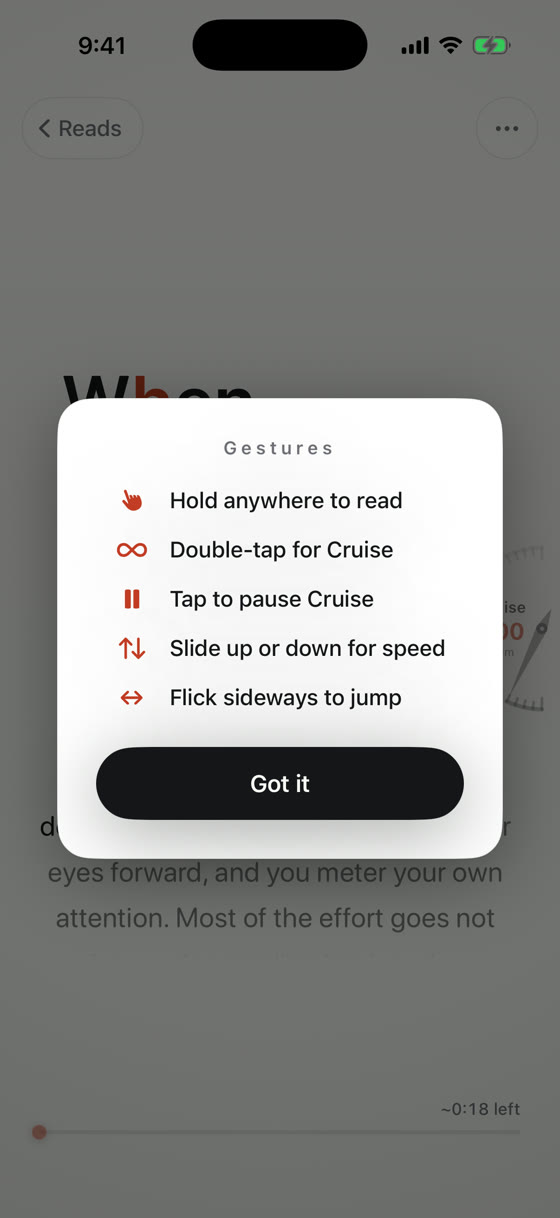
You hold anywhere to read, and lifting your thumb is an honest pause. A double-tap starts hands-free “Cruise,” and one tap stops it. Sliding up or down changes the speed, in 25 WPM steps from 300 to 1,000. A sideways flick replays the current sentence or skips to the next.
When you pause, the surrounding prose rises into view, and the word you stopped on is highlighted in the theme’s accent color. I call that the Threadline, and it turned out to be the most important feature in the app. More on that below.
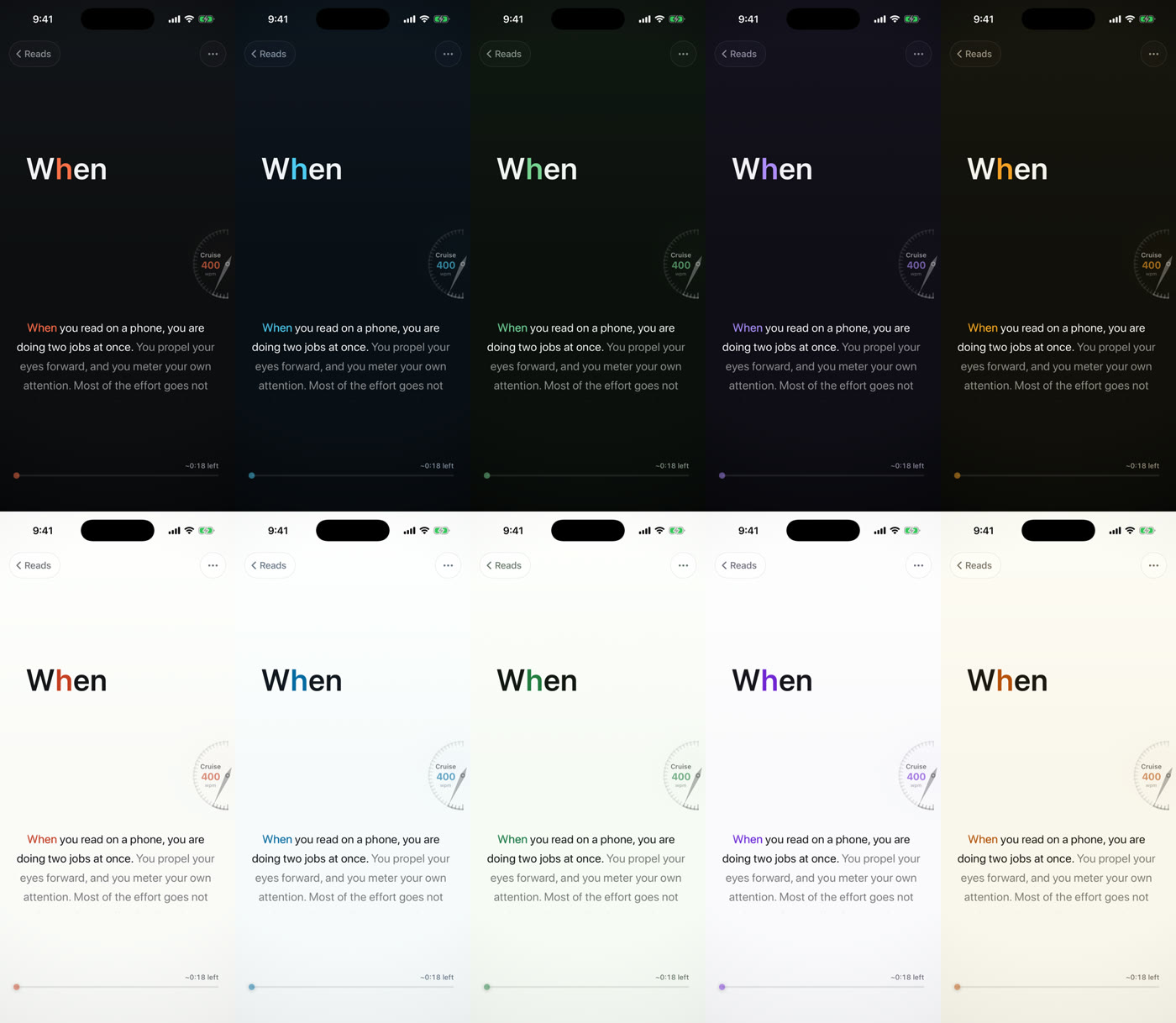
There are five color themes, each with a light and a dark variant. Each theme has exactly one accent color. It’s used for the pivot letter, the progress line, and the active word, and never for chrome.
The red letter
When your eye lands on a word, it doesn’t land on the middle. Recognition is fastest when you fixate a little left of center, which is known as the optimal viewing position. O’Regan and Jacobs (1992) put the cost of missing it at about 20 ms per letter.
RSVP apps turn that into a rule. They pick one letter per word, color it, and lock that letter to the same spot on screen every time. Skim’s rule is deterministic and lives in a tiny pure function. For words of 2 to 5 letters it’s the 2nd letter, for 6 to 9 letters the 3rd, for 10 to 13 letters the 4th, and after that the 5th. Leading quotes and brackets are skipped, so "word pivots on the same letter as word.
To see why the lock matters, compare the two sides below. They show the same words with the same timing. On the left, each word is centered. On the right, the pivot letter is locked to the tick marks.
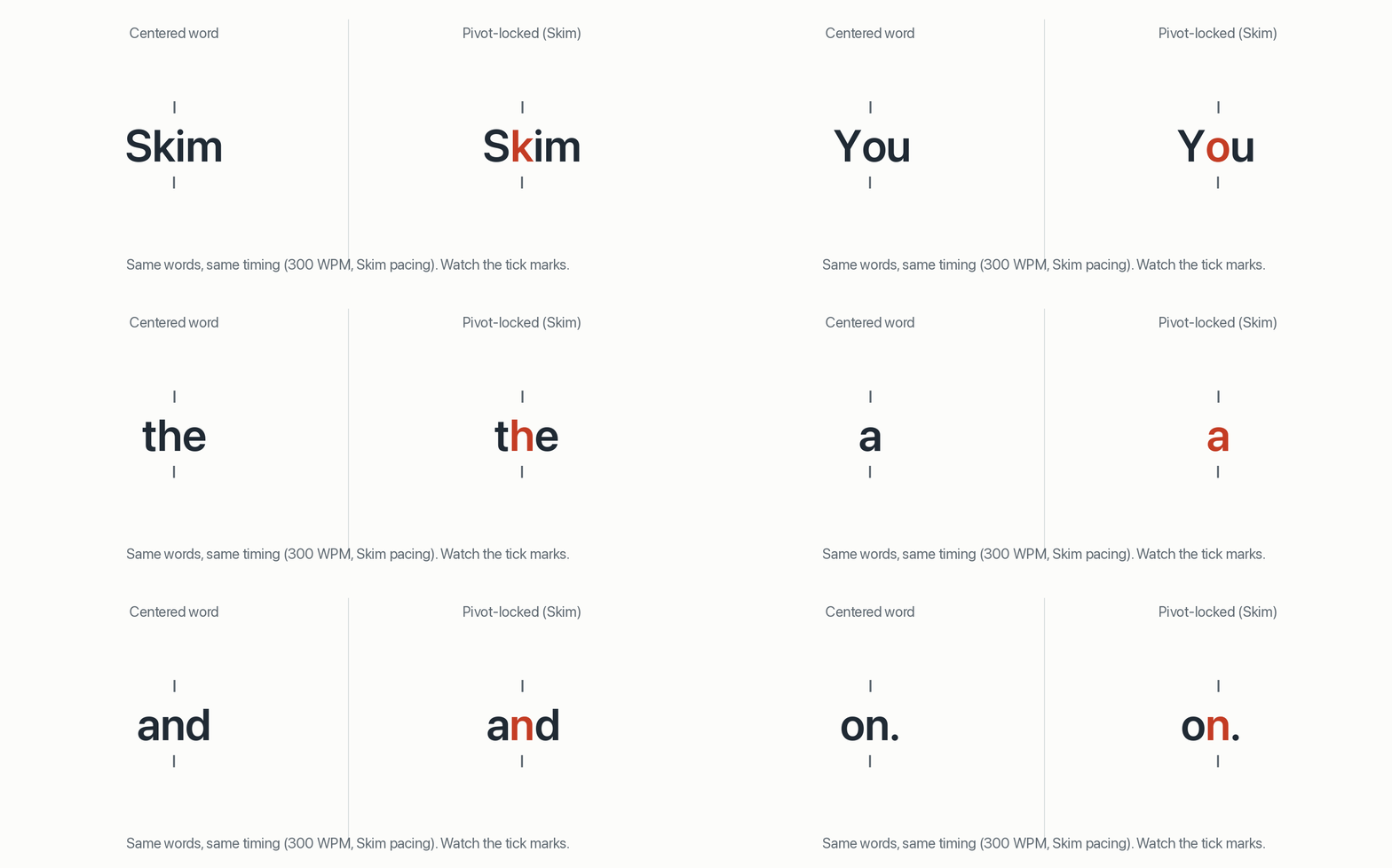
On the left, your eye has to find a new landing spot for every word. On the right, it can sit still. That’s the theory, and it’s a good one.
Spritz’s marketing came before there was any direct evidence. The one direct test of Spritz-style alignment and pivot coloring inside RSVP (Kosch et al., 2020, a small study) found no effect on comprehension, workload, or EEG. My research notes summarize it as strong theory, null direct evidence, and my rule for the app is: keep it, never claim it. It plausibly makes the display feel calmer. I don’t get to say it makes you read better.
What you give up when the text moves for you
Normal reading isn’t a smooth sweep. Your eyes jump, pause, peek ahead at the next word in peripheral vision, and roughly 10–15% of the time jump backward to reread (Rayner, 1998). A line from my notes I keep repeating is: “Eye movements are part of reading, not dead time.”
RSVP removes all of that at once. There’s no peeking ahead and no going back. Schotter, Tran & Rayner (2014) measured what that costs. When rereading was made useless, comprehension dropped, for ordinary sentences as well as tricky ones. Readers who could reread lost little time and recovered their understanding. The literature review I put together rates this the central structural cost of RSVP, with strong evidence behind it.
The broader findings are consistent:
- At about 250–350 WPM, single-word RSVP matches page reading on overall gist in several studies (Juola et al., 1982; Di Nocera et al., 2018; Kosch et al., 2020).
- Literal, word-for-word recall can already trail page reading at around 250 WPM (Benedetto et al., 2015).
- Comprehension starts to degrade around 400–450 WPM and is severe by 500–1,000. In one study, native speakers fell from 81% to 57% and 51% (Boo & Conklin, 2015). Page reading beat RSVP at 700–1,000 WPM (Acklin & Papesh, 2017).
- Understanding a sentence in the moment isn’t the same as remembering the paragraph (Potter et al., 1980; Masson, 1983). There’s almost no delayed-retention data for any RSVP product.
- The realistic speed gain at comprehension-preserving rates is modest, roughly 350 vs. 280 WPM in Kosch et al. Claims of reading 2–3× faster with the same comprehension are contradicted by the big reviews (Rayner et al., 2016).
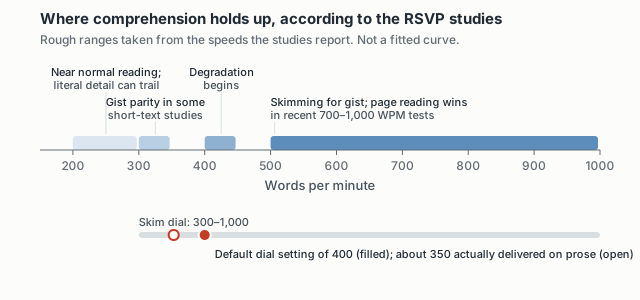
So what I claim for RSVP is narrow: calm, paced, distraction-resistant reading of short-to-medium text, with strong ways to recover when you lose the thread. I don’t claim faster reading with equal comprehension.
Pauses at the boundaries
If you show every word for exactly the same time, the stream feels like a ticker. Your mind never gets a moment to close out a sentence. The best-supported timing fix in the literature is boring: pause at the boundaries. Masson (1983) found that about 500 ms between sentences repaired most of the deficit of uniform RSVP, and 1,000 ms added nothing. Castelhano & Muter (2001) and Rahman & Muter (1999) point the same way. Put the slack at the boundaries and keep the within-sentence rate steady.
Skim’s tokenizer marks every boundary explicitly. The pacing code multiplies a word’s base time by:
- 1.4× before a comma, semicolon, or colon;
- 2.0× at a sentence end;
- 2.8× at a paragraph end;
- 1.15× for long words and complex numbers.
The multipliers don’t add. A word gets the largest one that applies. This is one sentence pair run through the app’s real pacing code at 400 WPM:
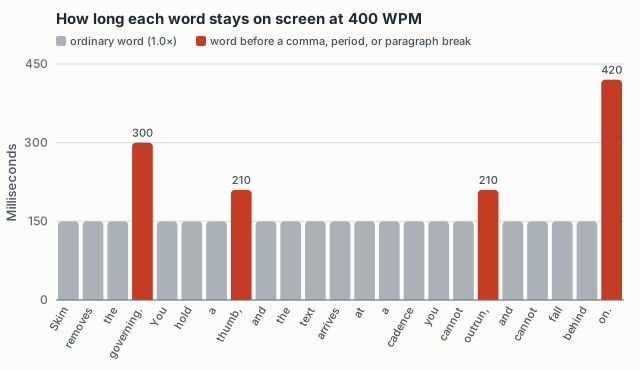
A comma is a beat, a period is a rest, and a paragraph is an inhale. My research notes say the direction is strongly supported, but the specific magnitudes are “untested engineering choices.”
Multipliers at high speed
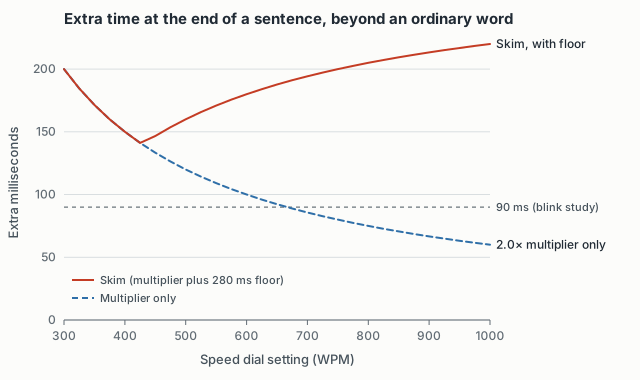
Multipliers have a problem at the top of the dial. At 1,000 WPM an ordinary word gets 60 ms, so a 2.0× sentence pause is only 120 ms in total, which is 60 ms more than an ordinary word. The attentional-blink literature, which uses letter-detection tasks rather than connected reading, suggests the mind needs a gap of at least ~90 ms to finish with one item before it can take in the next (Raymond, Shapiro & Arnell, 1992; Grassi et al., 2021).
So Skim adds absolute floors at boundaries: 180 ms for a clause, 280 ms for a sentence, and 400 ms for a paragraph. They’re tuned to do nothing at 400 WPM and below, so everyday reading feels the same. Above that, they stop the pauses from disappearing:
Dial speed and delivered speed
The research report I wrote made one point I hadn’t taken seriously: nominal WPM, the number on the dial, isn’t delivered WPM. Pauses cost time, so I ran a 104-word passage through Skim’s actual tokenizer and pacing code at every dial setting:
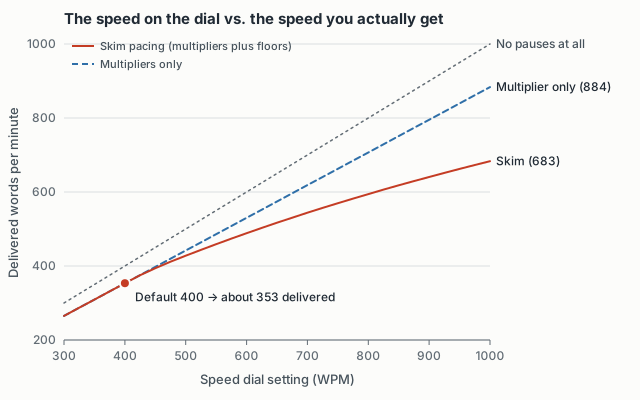
The default of 400 on the dial delivers about 353 words per minute on real prose, which lands inside the range where studies find gist comprehension holding up. The top “Blast” setting of 1,000 delivers about 680. I didn’t design it that way on purpose; it fell out of adding pauses where the research says they belong. It’s also a good reason to keep the number off the reading surface. The dial says “Cruise,” “Fast,” or “Blast,” and the exact number is secondary.
The studies report nominal speeds, though, and each study handles pauses differently. You can’t line their numbers up exactly against Skim’s, so the chart above is only a rough comparison.
Giving rereading back
If RSVP’s biggest cost is losing the ability to reread, the design has to give that ability back. My review puts it this way: “RSVP trades the reader’s self-regulation for the machine’s cadence, and every design decision either repays that debt or fails to.” Skim pays it back in four ways.
The first is hold-to-read. Guo & Wang (2018) found that under distraction, free-running RSVP comprehension collapsed to 23.9%. Pausing playback whenever attention was lost brought it back to 57.5%, about the same as normal reading. It’s the most product-shaped result in the whole literature, and hold-to-read is the cheapest version of it: your thumb is the attention signal. The caveat is that a thumb can stay down while your mind wanders off.
The second is sentence replay. A flick back replays the current sentence. In older studies, readers mostly ignored a two-word back-step, and sentence replay was the control they actually used (Muter et al., 1988). If you flick within the first two words of a sentence, it goes to the previous one, because at that moment “wait, what?” means the sentence you just finished.
The third is the Threadline. Pausing shows the full paragraph around your position, which you can scroll. It’s rereading with no limit, available the instant you let go.
The fourth is the resume glide. After a pause of two seconds or more, playback steps back three words and eases in. The first word runs 1.6× slow, and the pace returns to normal over eight words. A new hands-free read starts at 300 WPM and smoothly ramps up to your cruising speed over about a second. I have no evidence for either of these. It just feels less like being dropped into moving traffic.
The residue I haven’t solved is spelled out in my notes. Every recovery tool in Skim needs a gesture or a pause, while natural regressions are spontaneous, ~250 ms repairs in the middle of a line. There’s no gesture for “my eyes slipped.”
Phrases instead of words
Short words like of, the, and a each take a full beat in word mode. In the phrase spec I called that “visual churn without comprehension.” Phrase mode groups a short function word with the content word it leads into, up to three words or 16 characters. It never crosses a clause or sentence boundary, and each sentence gets exactly the same total time as it would in word mode. Leader words are dimmed so the content word carries the weight:
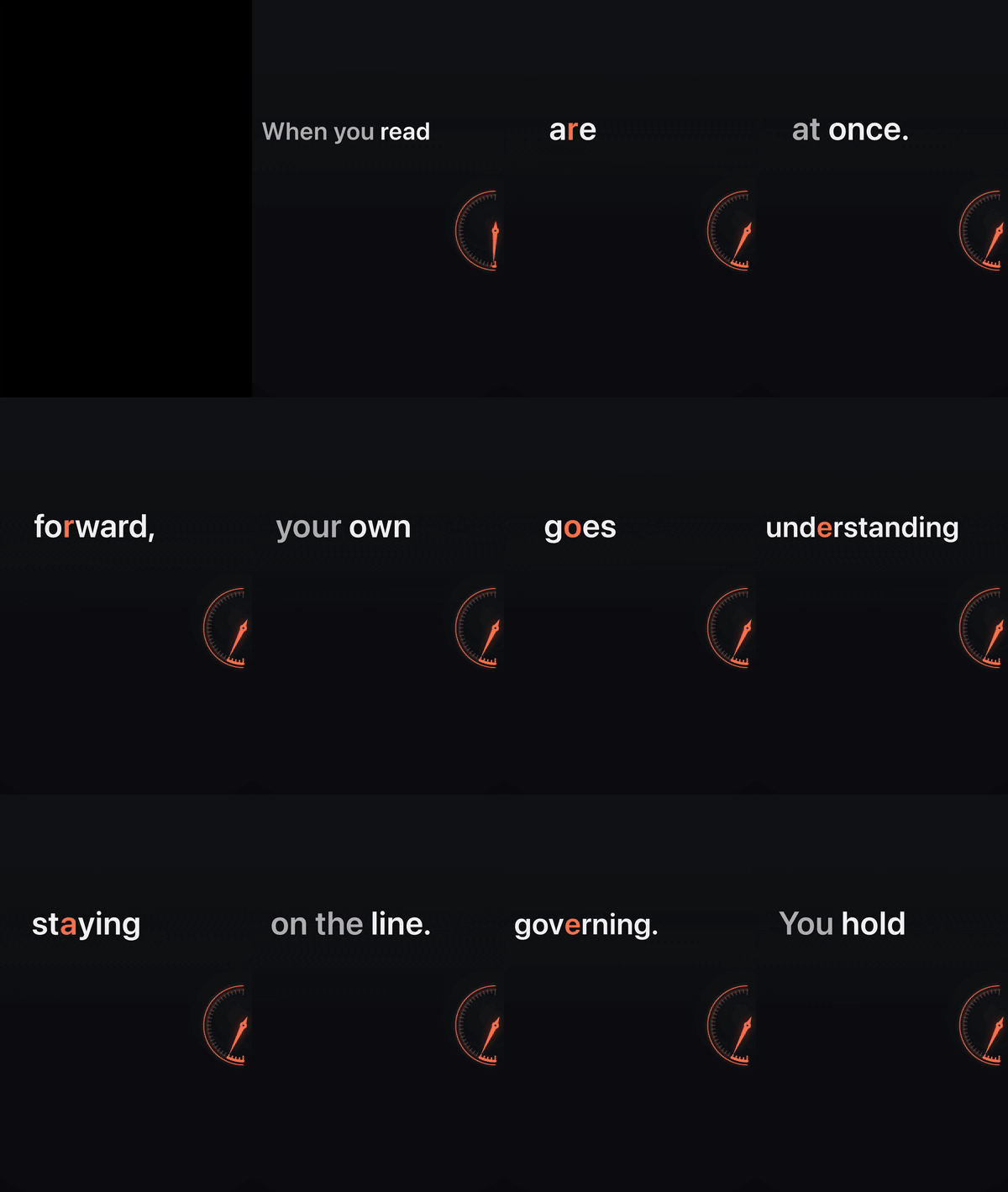
The evidence here is older and thinner. Cocklin et al. (1984) found that meaningful segments beat random ones, with a sweet spot near 12 characters. Schneps et al. (2013) found that very short lines helped some dyslexic readers, while strong readers did better on paper. So phrase mode ships as an opt-in toggle. Progress, bookmarks, and exports all stay word-based. The rule for the chunker was “a wrong merge shatters meaning, while a missed merge merely keeps word-mode behavior,” so when in doubt, it doesn’t merge.
A comprehension check
RSVP carries a nagging doubt: sure, that was fast, but did I get it? Left alone, that doubt kills the habit. So Skim has an optional comprehension check. After a read, it asks a few questions about the main thread of the text. They’re grounded in the text, never trivia, never punitive, and each has a “this seems off” flag so a bad question never reads as your failure.
It uses your own OpenAI API key (bring-your-own-key), stored in the iOS Keychain. There’s no Skim account, no server of mine in the loop, and no developer key. That’s also its commercial weakness, because almost no mainstream App Store customer has an API key.
The line I drew for AI in this app is to not let it replace what you read, and to use it to help you stay with the text and prove you read it. No summaries, ever. A summary outsources your attention, and the whole point of the app is to give your attention back.
Listening along
The same line allowed one more AI feature, read-aloud. The voice reads the verbatim text, with no summary. The paragraph stays on screen, and the current word is highlighted in sync with the audio:
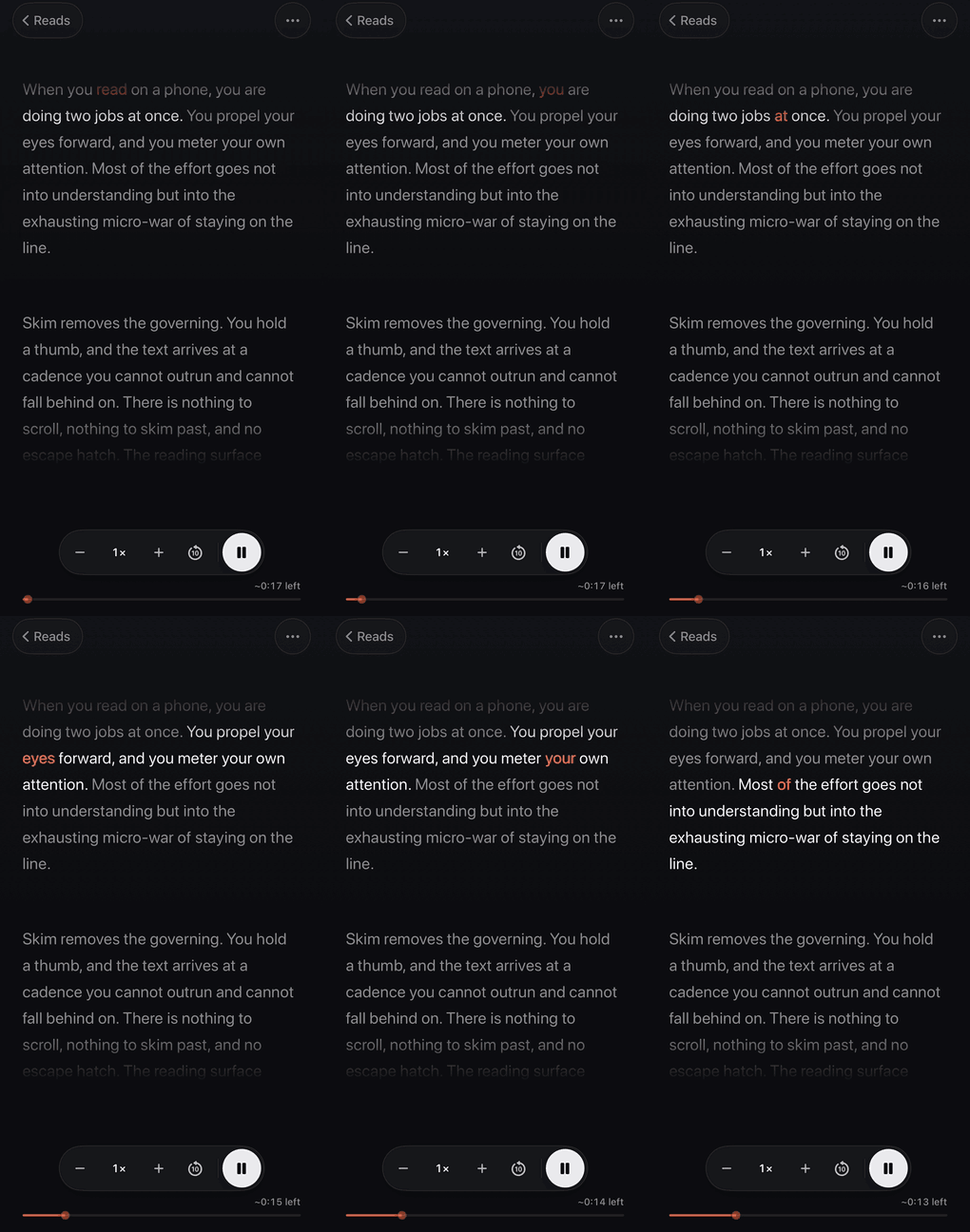
The research here is mixed. A meta-analysis of 46 studies found listening and reading roughly equivalent overall (g = .07), with self-paced reading ahead on inference (Clinton-Lisell, 2022). Reading while listening helped most when the pace was forced, and barely at all compared with reading at your own pace. My notes say highlighting “is an attentional cue, not a comprehension guarantee.” So read-aloud is offered as another way to take in the same text, with no claim that it’s a better one.
Two rules from that spec came from getting it wrong first: “Browsing must not silently seek,” and “Recovery is always one tap.” If you scroll ahead while the voice is reading, the audio keeps going, and a single button brings you back.
PDFs, with proof
Long documents come in as PDFs, which are hostile to one-word-at-a-time reading. Two-column layouts, running headers, page numbers, and hyphenation all break the stream. Skim extracts text on the device, using Apple’s PDFKit first and falling back to on-device text recognition (OCR), with no account or key needed. Then it shows the original and the extracted text side by side, so you can check the reading order before you trust it:
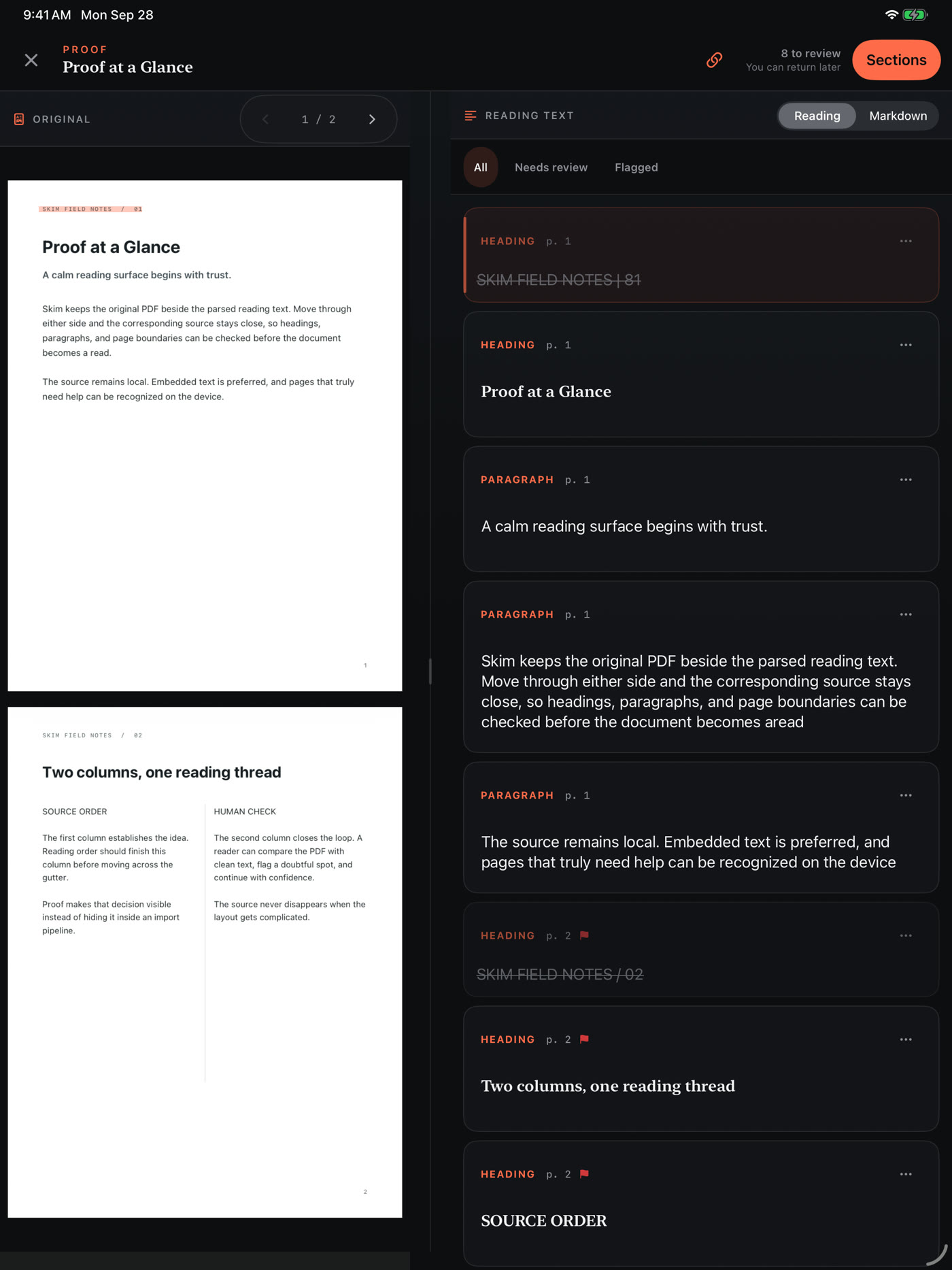
The spec is blunt about the limits: it “is not a promise that arbitrary PDF layout can be converted perfectly.” The point is that you can see where it went wrong. I didn’t have to stage an example, either. In the screenshot above, the fourth block ends “becomes aread” where the page says “becomes a read.” That’s a real bug I found while taking screenshots for this post, which is exactly the sort of thing Proof exists to catch.
Coming back later
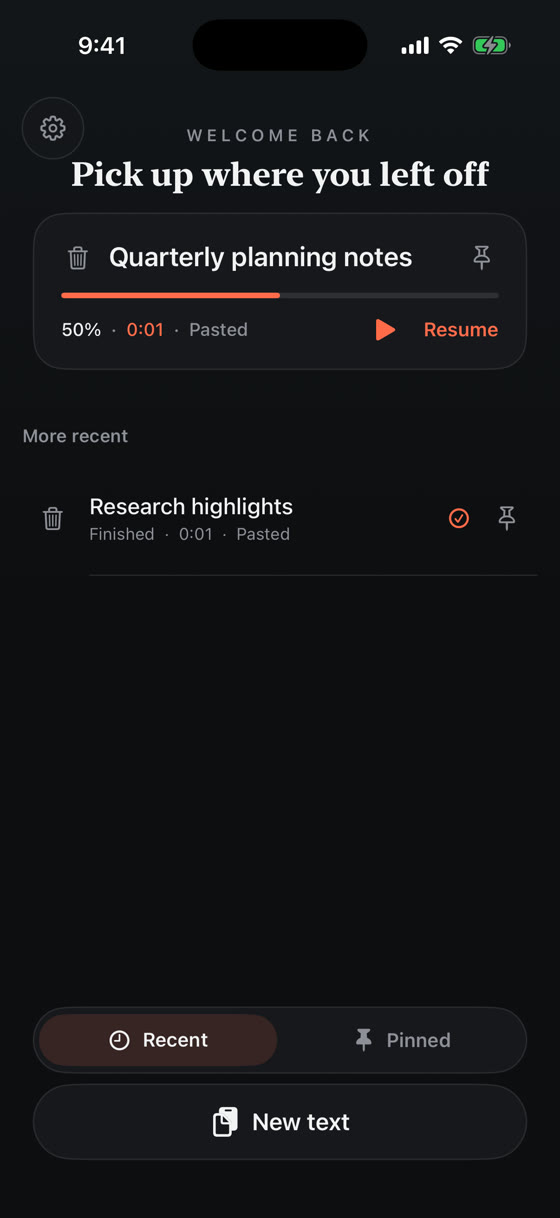
Reads are saved on the device in a small SQLite database, with your position and pins. No sync and no cloud library. The clipboard is the library.
How it’s built
Everything that decides behavior is plain Swift with no UI framework: the tokenizer, the pivot rule, pacing, sentence navigation, the resume glide, phrase chunking, and persistence. A dependency-free check suite pins down the rules above, like the pivot buckets, the two-word replay window, and the pause floors. The charts in this post were computed by calling that same core code.
The iPhone/iPad app and the Mac app both compile that core directly, so the reading model can’t drift between platforms. On the Mac, ⌥Space opens a floating panel over any app. You hold space to read, and ⏎ saves the current sentence to a plain Markdown file.
The opening GIF came from a small command-line tool that renders Markdown into a 1080×1920 video using the same tokenizer and pacing as the app. What you see in an export is exactly what you’d get reading.
Open questions
The research left me with more open questions than answers, and I’ve written down the experiments that would settle them.
The first is whether recovery actually works: compare page reading, Skim, and a locked Skim with no replay or Threadline. My notes call this “the central unproven product hypothesis.” Then words against phrases, at matched time, at 350 and 500 WPM. Then whether 400 is the right default, by testing 350, 400, and 450 WPM. If 400 costs five points of comprehension or more, I’ll move it. Then whether the red letter does anything, with the pivot highlight on and off. I expect no difference. Next-day retention across speeds is essentially unmeasured for any RSVP product, so that’s on the list too.
I’d also like an ADHD replication at real product speeds. Moussaoui et al. (2025) found an interesting effect at about 240 WPM. External pacing is a known accommodation, and the people I’d most like this to help are the ones whose attention won’t hold the page on its own. But one study is something to replicate, and I won’t market on it.
The claims I’ve ruled out for this app are that RSVP “eliminates wasted eye movement,” “stops subvocalization,” is “easier on the eyes,” or helps with low vision. For low vision it measurably doesn’t: RSVP scored about 46% vs. 74% for scrolling text in one study (Akthar et al., 2021).