An RStudio addin that makes GitHub permalinks in one keystroke
perma is an RStudio addin that builds a GitHub permalink, pinned to the current commit, for the lines under the cursor, and follows a pasted permalink back to the file and line.
I talk about code with other people a lot. The conversation usually goes like this: “Look at the function in perma_link.R. No, the other one. Around line 40. Actually I’ve changed it since, pull first.”
GitHub already solved this. A permalink is a URL that points to specific lines of a file at a specific moment in the repo’s history. Click it, and GitHub opens the file with those lines highlighted. It will show the same code next week, even after the file has changed.
The problem is making one. On GitHub you have to find the file, click the line numbers, and press y to swap the branch name for the commit. From RStudio, where I’m actually looking at the code, there’s no shortcut at all. So I wrote perma, an RStudio addin that does it with one keystroke. It’s inspired by gitlinker.nvim, which does the same thing in Neovim.
The parts of a permalink
Here’s a real one. It opens lines 3 to 5 of one of perma’s test files:
https://github.com/joeDespres/perma/blob/9b62543054ab4e1c9e6ea60da69458c3cdcb973e/tests/testthat/test-link-creation.R#L3-L5It’s five pieces glued together:
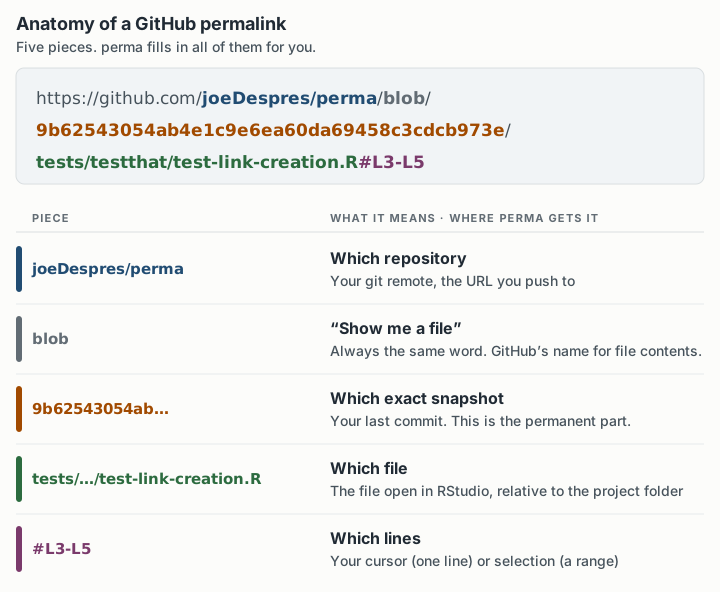
RStudio and git already know every one of these. perma reads them and fills in the template.
The commit SHA
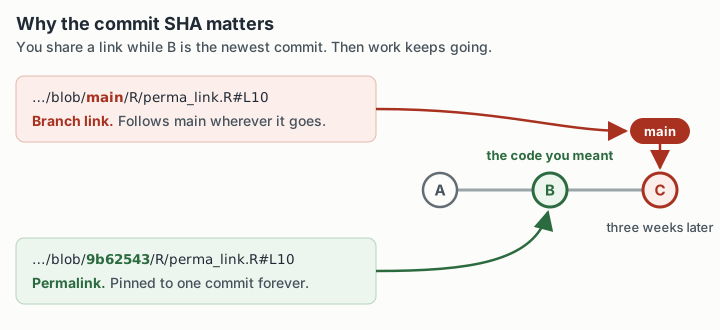
The long hex string is a commit SHA, the ID of one exact snapshot of the repo. That’s what makes the link permanent.
A link that names a branch, like blob/main/...#L10, follows the branch. Three weeks later main has moved on, and line 10 might be a different function, a blank line, or past the end of the file.
The three commands
perma adds three commands to RStudio’s Addins menu:
| Command | What it does |
|---|---|
| Send Perma-Link to Console | Builds the link for your cursor or selection and drops it in the console, ready to copy |
| Open Perma Link in Browser | Builds the link and opens it on GitHub |
| Move to Perma Link | The reverse: paste a link someone sent you, and RStudio jumps to that file and line |
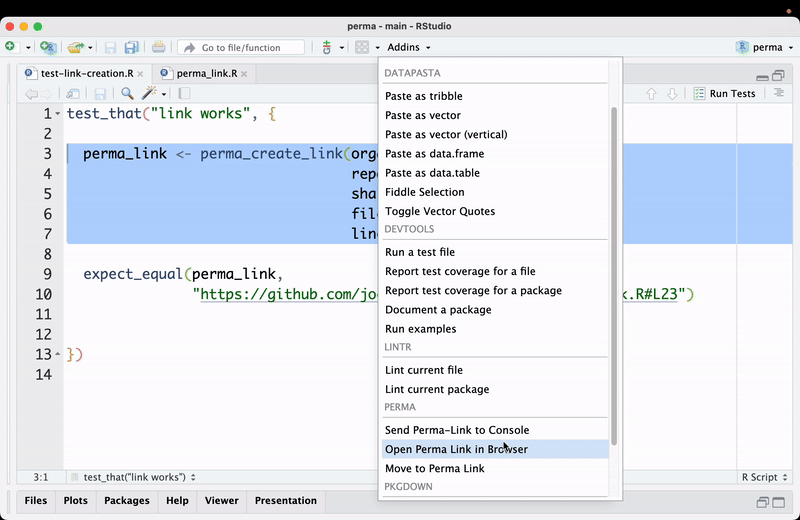
To share a link, put your cursor on a line or select a few, and run Send Perma-Link to Console. The link appears in the console:
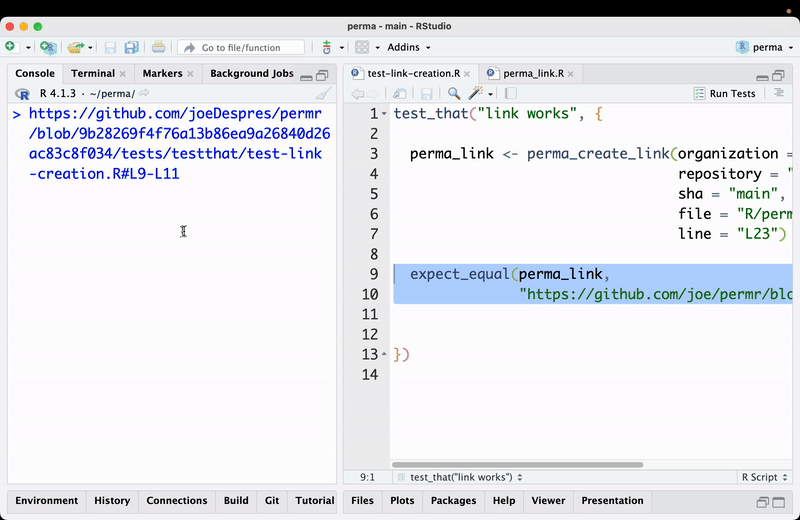
Copy it and paste it into Slack or a pull request comment.
Open Perma Link in Browser skips the copy step. GitHub opens at the pinned commit, with your lines highlighted:
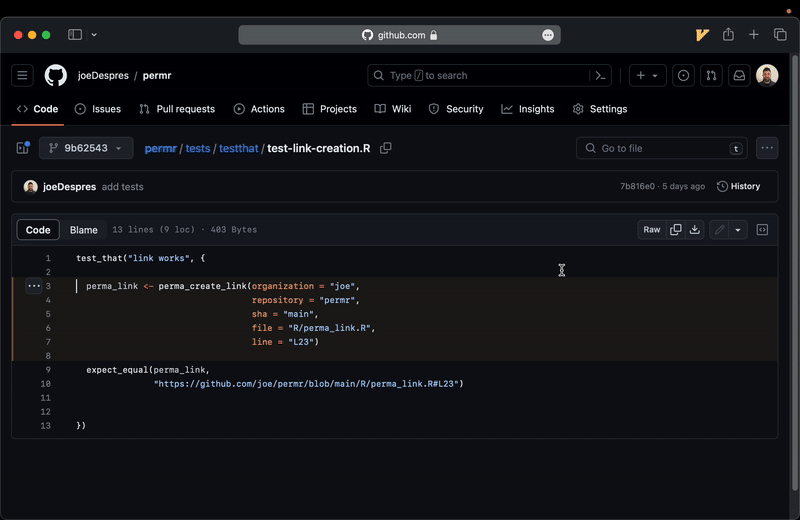
The commit picker at the top left says 9b62543 instead of main.
Move to Perma Link goes the other way, and it’s the one I use most. Someone sends me a permalink and I want to read the code in my editor. Run the command and paste the link at the prompt:
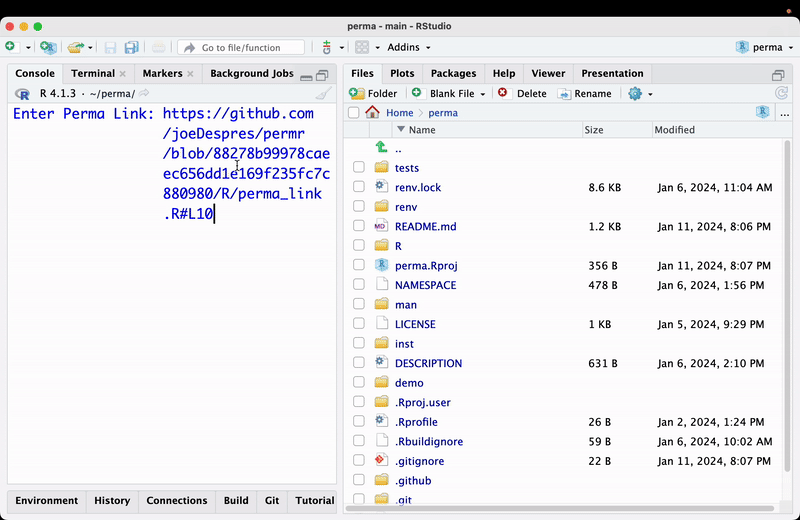
perma splits the link into repository, commit, file and lines. It checks for unstaged edits, and if it finds any, it stops, so it won’t check out over your work. If you aren’t already on the linked commit, it checks that commit out, so the code matches what the sender saw. Then it opens the file and puts your cursor on the first linked line.
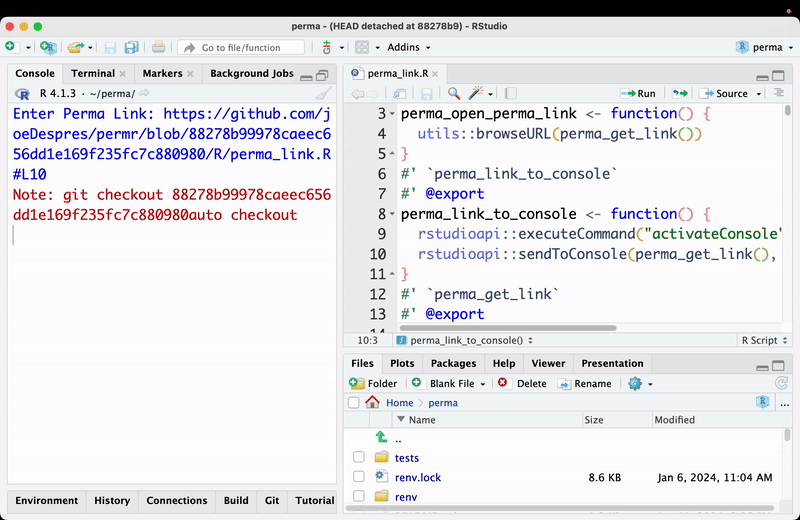
The window title, HEAD detached at 88278b9, comes from that checkout. You’re on an old snapshot, off your branch. When you’re done reading, go back with git checkout main (or whatever your branch is called).
Setup
Install from GitHub:
devtools::install_github("joeDespres/perma")The addins show up in the menu right away. They’re much better on a keyboard shortcut. You can set these in Tools → Modify Keyboard Shortcuts, or put them in ~/.config/rstudio/keybindings/addins.json:
{
  "perma::perma_link_to_console": "Ctrl+`",
  "perma::perma_move_to_link": "Ctrl+T",
  "perma::perma_open_perma_link": "Ctrl+G"
}
The code
The package is one R file of about 240 lines. The link itself is a single template:
stringr::str_glue(
  "{host}/{organization}/{repository}/{blob}/{sha}/{file}#{line}"
)
Everything else is gathering the pieces. For the repository, the git2r package reads your git remote URL. For an SSH remote it ends in github.com:joeDespres/perma.git. Drop everything up to the colon and the .git, split on /, and you have the owner and repo name. git2r::last_commit() gives the SHA of the commit you’re on. rstudioapi::getSourceEditorContext() gives the path of the file you’re editing, and perma removes the project folder from the front. The same call gives the selection’s start and end rows. One row becomes L9, and a range becomes L9-L11.
Going the other way is the same idea in reverse: split the URL on / and #, name the pieces, and hand the file and first line to rstudioapi::navigateToFile().
I renamed the repo from permr to perma partway through. Links made under the old name still open today, because GitHub redirects renamed repositories.
What it doesn’t handle yet
I built this over about ten days in January 2024, mostly for myself, and it works for how I set up projects.
The link uses your local last commit. If you haven’t pushed it, GitHub has never seen that SHA, and the link is a 404. perma warns about uncommitted changes, but it doesn’t check whether your commits have been pushed.
The owner and repo are parsed from an SSH remote, the kind that starts with git@. An HTTPS remote (https://github.com/owner/repo.git) isn’t handled. The file path is found by removing ~/<project name>/ from the front, so projects must live in your home folder. A project at ~/code/myproject keeps the extra folders and produces a broken link.
It supports GitHub only, with no GitLab or Bitbucket. Following a link checks out an old commit, and perma doesn’t take you back.