Tracing a chart screenshot back to the run that made it
gglineage writes an ID into a ggplot2 chart as a faint row of dots, so a screenshot that has lost its file name and metadata can still be traced to the script and data behind it.
Here’s the situation I built this for.
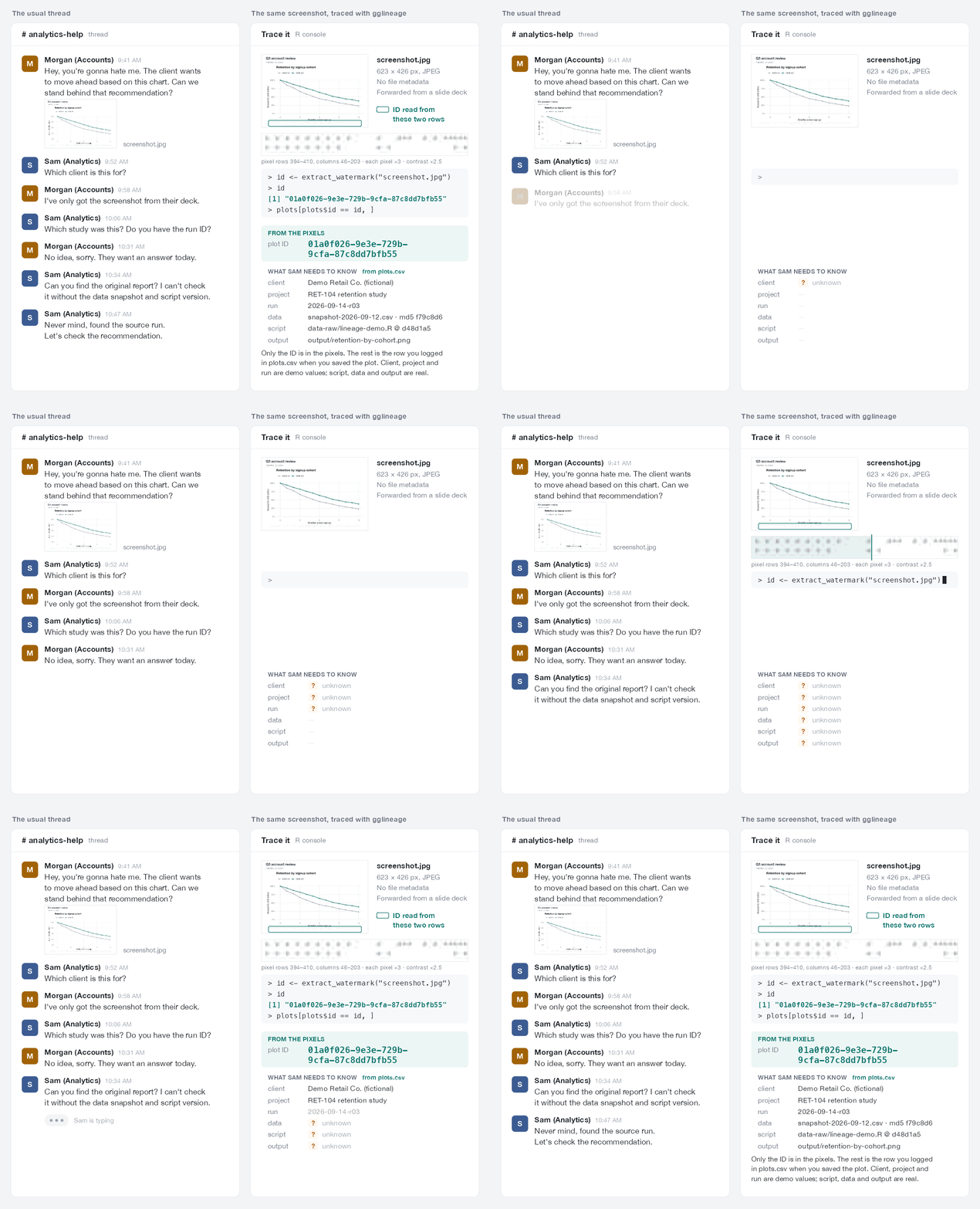
Someone from accounts drops a screenshot into a Slack thread. It’s a retention chart, cut out of a client’s slide deck. The client wants to move ahead based on it. Can we stand behind that recommendation?
To answer, the analyst needs six things: which client, which study, which run, which data snapshot, which version of the script, and where the original report is. The screenshot has none of them. It’s a 623 × 426 pixel JPEG with no file metadata. The file name is gone. The title says “Retention by signup cohort”, which describes a dozen charts. The person who sent it only has the screenshot, and the client wants an answer today.
So the analyst goes digging through old folders and old decks, or rebuilds the chart from scratch and hopes it matches.
Charts get saved, pasted into slides, screenshotted, pasted into chat, shrunk, and re-saved as JPEGs. Every hop strips something: the file name, the PNG metadata, the folder it lived in. The one thing that reliably survives is the picture.
So I put the ID in the picture. gglineage is an R package that writes an ID into a ggplot2 figure as a faint row of dots along the bottom margin, then reads it back out of the pixels of any copy. Log the ID when you save the plot, and a screenshot leads back to the row you logged.
Using it
The watermark is one more + on the plot:
library(ggplot2)
library(gglineage)

p <- ggplot(mtcars, aes(wt, mpg)) +
  geom_point() +
  watermark_dots("RUN-42")

file <- tempfile(fileext = ".png")
ggsave(file, p, width = 7, height = 5, dpi = 150)

extract_watermark(file)
#> [1] "RUN-42"
Then abuse it. Shrink it by half, pad it with window chrome like a screenshot, and push it through JPEG at quality 50 (the tf_ functions aren’t exported. They’re image transforms from the package’s test helpers, so this snippet needs that file sourced, or any image editor in their place):
img <- png::readPNG(file)
abused <- tf_jpeg(tf_pad(tf_resize(img, 0.5), 40), quality = 50)

extract_watermark(abused)
#> [1] "RUN-42"
The dots carry the ID and nothing else: up to 16 bytes of text, up to 16 characters of a compact base32 ID (5 bits each, which is what the diagram below shows), or a full 128-bit UUID. Everything you’d want to know later goes in a record you keep, keyed by that ID. ggsave_watermark() is a drop-in for ggsave(), and the record can be as simple as a CSV with a row per saved plot:
id <- wm_uuid(version = 7)   # starts with a timestamp, so rows sort by time
ggsave_watermark("retention-by-cohort.png",
                 ggplot(mtcars, aes(wt, mpg)) + geom_point(),
                 id = id, width = 7, height = 5, dpi = 150)

row <- data.frame(id = id, script = "analysis/fig2.R", commit = "9f3c2e1",
                  data = "snapshot-2026-09-12.csv")
write.table(row, "plots.csv", sep = ",", row.names = FALSE,
            col.names = !file.exists("plots.csv"),
            append = file.exists("plots.csv"))
Weeks later, when all anyone has is a screenshot:
plots <- read.csv("plots.csv")
plots[plots$id == extract_watermark("screenshot.jpg"), ]
The right side of the animation above is that lookup, run for real on the JPEG from the thread. The client, project and run in it are demo values. The script, data snapshot and output path are real.
How the dots work
Each dot position is one bit. A dot is a 1, a gap is a 0. Here’s the row for the ID K7Q2M9XD:

The start sync is eight evenly spaced dots. The decoder locks onto them and measures the spacing, so it doesn’t care how big the image is. The header says what kind of ID follows. Then come the payload, a 32-bit check (two CRC-16s over the header and payload), and an end sync. A UUID needs two rows, one above the other.
To decode, it scans the image row by row and compares each pixel with its neighbors, so window borders and page colors don’t confuse it. A row only counts if both syncs, the header and the 32-bit check all agree. A damaged row gets past that about once in four billion readings. So extract_watermark() returns the exact ID that was drawn, or NULL. It doesn’t guess.
Never the wrong run
A NULL means asking around for the original file, which is where you started. A wrong ID sends you to the wrong data with confidence, which is worse than the Slack thread. A lot of the work after the first version went into ruling that out.
One example. A UUID is two rows, and originally each row was checked only on its own. An adversarial test stacked two wide, short strip charts with different UUIDs and cropped the screenshot tight. The decoder read the first half of the top chart’s UUID and the second half of the bottom chart’s, and returned an ID that had never been drawn. It did that 6 times out of 6. Now each row’s 32 check bits are split: 16 check the row on its own, and 16 check it against the whole UUID. A UUID only comes back when all 64 agree, so halves of two different charts never get joined.
The README’s robustness table pushes a 7 × 5 inch plot at 150 dpi through 37 transformations. The dot code comes back from 30 of them, including JPEG at quality 25, ten rounds of re-encoding, a shrink to 15% (158 × 112 pixels), grayscale, and an inverted dark-mode copy. It doesn’t survive cropping the bottom 5%, cropping the left 10%, a 90 degree rotation, brightening by 15%, JPEG at quality 5, a shrink to 240 pixels wide with JPEG 50, or a shrink to 10%. Those return NULL. None of the 37 returns a wrong ID.
Screenshots rarely make one hop, so I also ran charts with fresh UUIDs through chains of one to five real hops: headless Chrome screenshots at different sizes and on light and dark pages, phone screenshots, crops, and recompression by Slack, X, WhatsApp, Teams, email, iMessage and Discord. In the latest run of 400 chains and 1,110 decodes, a chart that stayed at least about 560 pixels wide decoded after every chain. Below 480 pixels it decoded 57% of the time after zero or one lossy hop, and 27% after two or more. Across four full campaigns, about 4,450 decodes, no decode has returned a wrong UUID.
What it doesn’t do
- Anything through the strip. Crop off the bottom edge or a side and the row is gone.
watermark_tiles()repeats a short ID in a faint grid behind the data in each panel, which survives cropping. It’s weaker, and its 16-bit check lets a corrupted reading through about once in 65,000 tries, so treat an ID read from tiles alone as a lead to confirm. - Rotation, heavy brightening, or very small copies. Rotate the image back first. Past about +10% brightness the faint dots clip to white. Below the widths above, ask for the original.
- Data lineage. The ID belongs to the figure. gglineage doesn’t track rows, filters or joins. What the data was goes in the record you keep.
- Security. Anyone who knows the dots are there can crop or paint over them. This is for ordinary sharing, where nobody is trying to break the trail.
It’s not on CRAN yet. Install it from GitHub:
# install.packages("pak")
pak::pak("despresj/gglineage")