Building an Aliens motion tracker with a 24 GHz radar
A radar module, an I2C-to-UART bridge, and a 4.3-inch ESP32 screen. The signal chain works and the scope runs at 30 FPS. It hasn't looked through a wall yet.
The motion tracker in Aliens is a handheld box with a green scope and a ping that speeds up as something gets closer. I wanted one that works. It should be handheld, show a sweeping scope with range and closing speed, and have audio that gets more urgent. The stretch goal is to see a person moving on the other side of an interior wall.
This post covers the first three evenings, 18 to 20 September 2026. The radar talks to the screen and the scope runs at 30 frames a second. The audio code runs, but I haven’t heard it yet. The through-wall part is planned and has a pass/fail test written down, but I haven’t run the test.

The screen design with a simulated contact walking in from 13 m. This was recorded from the browser mock I designed the screen from, not from the device, which has the same layout.
The hardware
It’s three boards and some jumper wires.
The radar is a DFRobot C4001 (SEN0609), a 24 GHz FMCW module. It reports whether something is present, how far away it is, and how fast it’s moving. The beam is 100° wide and 40° tall, and the rated motion range is 25 m.
The brain and the display are one board, a Waveshare ESP32-S3-Touch-LCD-4.3C: an ESP32-S3 with an 800×480 touchscreen, 8 MB of PSRAM, 16 MB of flash, an audio codec, a speaker header, a microSD slot, and a Li-ion battery connector.
The third board is a DFRobot DFR0627, an I2C-to-dual-UART bridge built on the WK2132 chip. I didn’t plan to buy it, but I needed it.
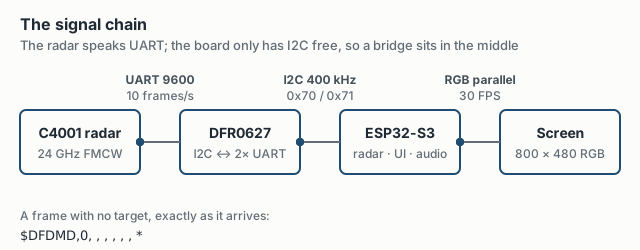
There’s no phone app, no Wi-Fi, and no second processor. The radar feeds the bridge, and the bridge feeds the screen:
Why there’s a bridge board
My first plan skipped the bridge. The C4001 family includes an I2C version, so I assumed I could put the radar on the board’s I2C bus. The version I own, the SEN0609 (25 m), doesn’t have I2C. It only has UART. The I2C one is a different SKU, the SEN0610 (12 m). Next time I’ll check the exact SKU’s datasheet before designing the wiring.
That would be fine on most ESP32 boards. On this one, the only UART pins go to the audio codec, and the board doesn’t expose any other UART. The one bus I could reach was I2C on GPIO8 and GPIO9. That’s why the DFR0627 is there: it hangs off I2C and provides two real UARTs.
I found three wiring details that could have cost me an evening or a board.
The wire colours are the reverse of the header colours. The radar’s TX goes to the bridge’s R pin, which is green, and I was using a blue wire. I checked the wiring against the pin labels and ignored the colours.
The screw terminal has two power pins next to each other. Pin 3 is a 3.3 V output. Pin 1 is the 7–36 V input. Before power-on I checked both schematics, and the red wire went to pin 3.
The bridge’s address switches can collide with something already on the board. The ESP32 board already has five chips on its I2C bus: the codec, the mic ADC, a real-time clock, the touch controller, and an IO expander. One of the four DIP-switch settings would have put the bridge on the clock’s address. I set both switches high, which puts the bridge at 0x70.
Bringing it up one link at a time
I brought the system up one step at a time and didn’t move on until each step was proven:
- An I2C scan that finds all 13 addresses: the five onboard chips plus the bridge’s registers, FIFOs, and aliases.
- A raw dump of radar bytes through the bridge. I checked it byte for byte against the documented frame format.
- The command channel, which proves transmit works as well as receive. The radar answered with its hardware version, its firmware version, and a 0–26 m range.
- Parsed targets.
Once all four worked, the console looked like this:
TARGET  count=1  range=0.55 m  speed=+0.12 m/s  energy=10525985
TARGET  count=1  range=0.41 m  speed=+0.29 m/s  energy=3630344
[health] 4600 bytes, 0 I2C errors, 0 FIFO overflows
This order paid for itself right away, because two of the bugs weren’t in my code, and I found both quickly because everything below them was already proven.
The bridge library adds bytes that the radar never sent. DFRobot’s IICSerial library checks how much data is waiting by reading two registers, and it races between them. Sometimes it reports 256 bytes waiting, then reads an empty FIFO and hands back zeros. It also ignores I2C errors. I kept the library for setup and transmit, and I now read the chip’s FIFO registers directly with every read checked.
Printing to USB serial could freeze the program. On ESP32 Arduino core 3.3.12, with no program on the computer reading the port, each Serial write blocks for up to two seconds. While the loop waited, the bridge’s receive FIFO overflowed and radar frames were lost. The fix is two lines: a zero transmit timeout and an 8 KB buffer.
One problem was on the computer side. macOS asserts the DTR and RTS serial control lines whenever a program opens the port, and the ESP32’s USB interface treats certain DTR/RTS combinations as a reset request. For a while, just reading the console could reboot the board. Every helper script now clears RTS as soon as it opens the port.
The screen
The board’s 4.3-inch display isn’t a simple SPI panel. It’s an RGB parallel panel that needs Waveshare’s exact timing setup. A standard MicroPython build boots on this board, but it doesn’t light the screen.
I skipped LVGL. The scope is custom drawing anyway, so I used Waveshare’s esp_lcd setup code and draw directly into the two framebuffers the driver allocates in PSRAM. I switch between them by swapping a pointer, which takes 27 µs.
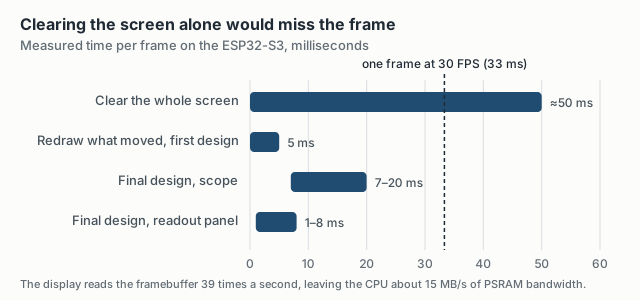
The hard limit is PSRAM bandwidth. The display DMA reads the framebuffer 39 times a second, which leaves the CPU about 15 MB/s. Clearing the full screen takes around 50 ms, which is too slow for 30 FPS. So the grid is drawn once into a clean background copy. Each frame, the code erases only the sweep, the blip, and its trail by copying those areas back from the background. In the first design that took 5 ms a frame. The final design draws more, but it still fits, and the scope runs at 28–30 FPS.
The design uses one green on black, with no second colour. Alerts are inverted blocks and blinking text, the way a monochrome CRT would show them. Range is the big number.
The rule I care about most is that the scope doesn’t show information the sensor doesn’t have. The C4001 reports range but not direction. So every contact sits on the centreline, and the scope says RANGE ONLY NO BEARING. The sweep is decoration and never affects detection. A blip that drifts around the scope would look better, but it would be made up. When I add a sensor that measures angle, one function places the blip off the centreline, and nothing else in the UI changes.
The other states follow the same rules. An alarm uses the same green, inverted and blinking, with no red.
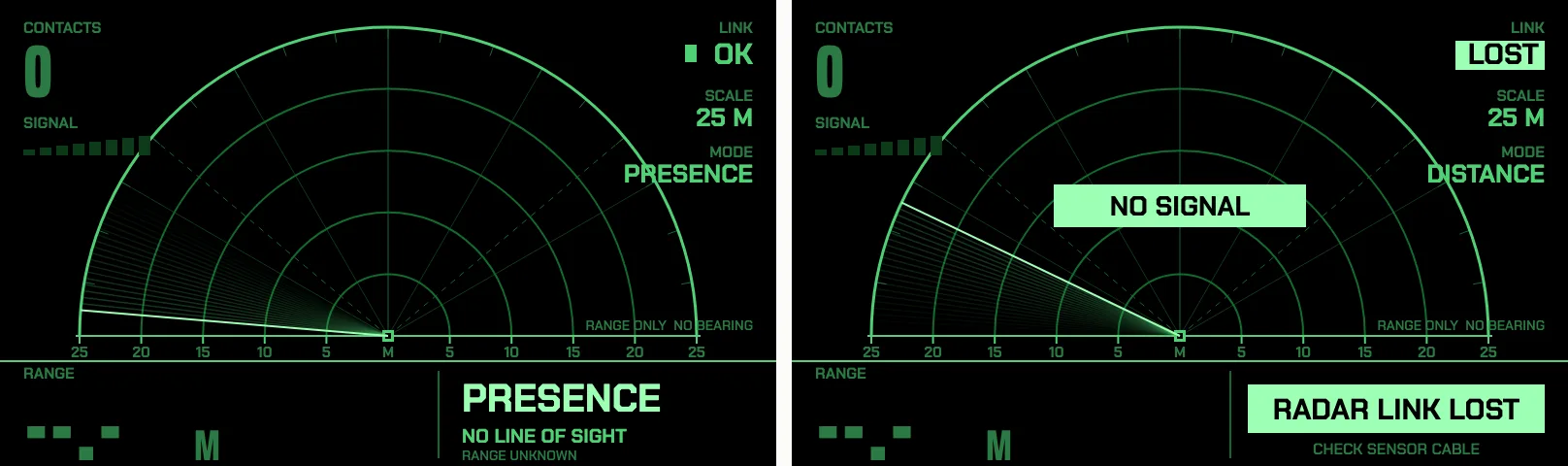
Presence with no line of sight (left) and a lost radar link (right), also from the mock.
On the device I’ve seen live contacts at 13.9 m and 7.6 m, marked APPROACHING. To check the screen, the firmware can dump the framebuffer over USB, and a script turns the dump into a PNG. I built this with an AI coding agent, and this is how it could see the screen instead of trusting my description. Along with the health line and a 10 Hz CSV output, the dump cost very little to build, and each one turned “it looks wrong” into a number. The touch controller code is written, but I haven’t tapped the screen to test it yet. The same view switch works from the serial console.
What the radar can’t do
The C4001 does all its processing internally, which made it easy to start with and makes it hard to push further. It:
- tracks one target at most
- reports no bearing
- gives no raw data: no ADC samples, no I/Q, and no range profile, over either UART or I2C
- documents speed as unsigned. Later I saw negative values, so the tracker works out approaching or receding from changes in range instead of trusting the sign.
- reports targets closer than the 1.2 m minimum on the product page. I saw 0.4 m.
None of this gets in the way of a tracker that works on the desk, but all of it matters for the through-wall goal.
Sound
The board has an ES8311 audio codec and a 3 W amplifier. Espressif’s driver for the codec expects the ESP-IDF I2C bus, and that bus can’t share GPIO8/9 with the Arduino Wire bus the radar bridge, touch, and IO expander already use. So I ported the codec setup to Wire. A separate task streams audio in 10 ms blocks.
A contact gets a sonar ping. The gap between pings is 160 + 55 × range ms, so it’s 1.5 s at 25 m and 0.2 s up close. The pitch rises from 700 Hz to 1.6 kHz as the target closes, and drops about three semitones when the target isn’t approaching. Presence with no line of sight gets a soft 520 Hz double pulse. A lost link gets a falling tone, which is also the power-on sound, because the radar link starts out down.
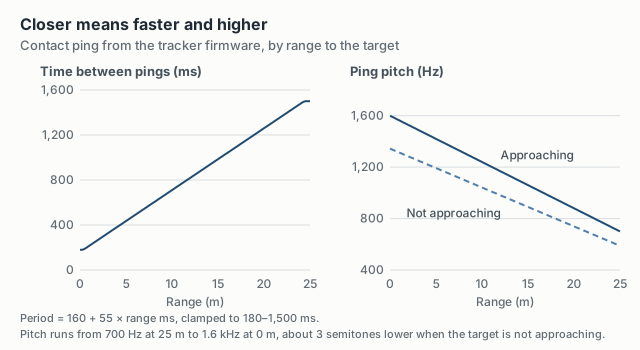
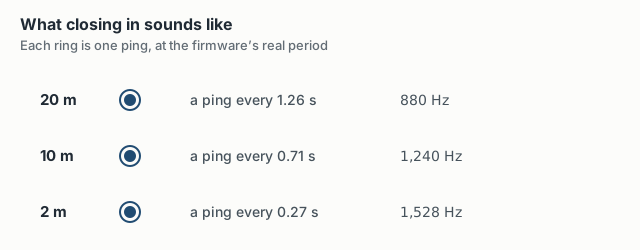
The codec answers, audio streams, and the ping counter goes up, all at a steady 30 FPS. I haven’t heard any of it. The speaker header is a 2-pin MX1.25 connector, and there’s no speaker in the box.
The through-wall test
At 24 GHz the physics works in my favour. Published measurements put one-way loss through 5/8” drywall at about 1.2 dB at 28 GHz. For a two-sheet interior wall with the radar signal going through and back, I estimate 4–6 dB of loss. Because the returned signal falls with the fourth power of distance, a person at 3 m returns about 37 dB more than a person at 25 m. So a few decibels of wall loss is small.
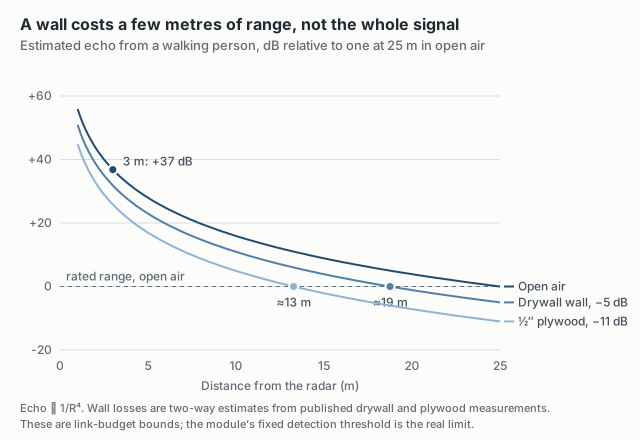
The wall does reflect a strong echo, but it’s a static echo. Every motion radar, including this one, ignores echoes with zero Doppler shift. That’s how it ignores furniture, and it also removes the wall. The open question is whether the module’s fixed detection threshold still catches a person whose echo is 5–12 dB weaker. Only a measurement can answer that.
Upgrading to a better radar is tempting. I wrote the pass/fail test before buying anything else, and three numbers decide whether I need to. With the detection threshold at 3 or lower (the default is 5), the C4001 passes if:
- it detects a person walking 1–5 m behind one drywall wall in at least 90% of 1-second windows,
- with at most 1 false-alarm window per 5 minutes when the room behind the wall is empty,
- and a median delay of 0.5 s or less from the start of motion to the first detection.
If it fails any of the three, I stop tuning the C4001 and move to the RFbeam K-LD7. That’s another 24 GHz module, but it has two receive antennas for bearing, signed speed, and raw I/Q data, and it can plug into the bridge’s second UART. The recorder and metrics scripts are ready. There are ten experiments, from an open-air baseline to walking behind a plywood sheet.
In the meantime, the firmware already runs the radar at its most sensitive setting. On the bench, with nothing moving, that gave zero false alarms at every threshold I tried, though each window was only 40–120 seconds long. The tracker needs a target in 2 of 4 frames before it shows one, and it keeps a lost target on screen for 1.2 s. When nothing has moved for 15 seconds, the radar switches to presence mode. That mode can detect someone sitting still. It can’t give a range, so the screen shows PRESENCE / NO LINE OF SIGHT / range unknown. Every 20 seconds, the radar switches back to distance mode for 8 seconds to check whether it can get a range. I tested this on the bench: it detects me sitting still at the desk. I haven’t tested it with someone walking on the other side of a wall.
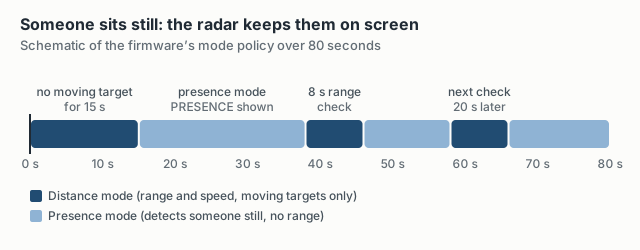
Each mode switch also reboots the radar for about 3 seconds, which the timeline leaves out.
Where it stands
| Piece | State |
|---|---|
| Radar → bridge → ESP32 signal chain | Working, 10 frames/s, 0 I2C errors |
| Tracker screen | Working on the device, 28–30 FPS, live contacts seen |
| Presence / no-line-of-sight mode | Bench-tested with a seated person |
| Touch to switch views | Written, not tested with a finger |
| Audio | Codec and stream verified. Not heard yet (no speaker) |
| Through-wall detection | Test designed, instruments ready, not run |
| Battery, enclosure, bearing | Not started |
Next: plug in a speaker, then stand on the other side of a wall and run the experiments.